Dataframe Manipulation#
A Quick Introduction to SportsLabKit’s DataFrames#
SportsLabKit seamlessly extends the popular data science library pandas to handle sports tracking data effortlessly. If pandas is foreign territory for you, it’s a good idea to skim through its Getting Started guide first.
Core Data Structures#
SportsLabKit introduces two power-packed DataFrames, built just for your sports analytics needs:
BoundingBoxDataFrame: Tailored to handle bounding box dimensions.CoordinateDataFrame: Designed for coordinate-based tracking data.
Both these structures have two key features:
They’re subclasses of
pandas.DataFrame, so you can do everything you do with a standard DataFrame.They inherit from
SLKMixin, which means they’re optimized to play well with theSportsLabKitAPI.
These are multi-level Pandas DataFrames with Team ID, Player ID, and other attributes. Each row is indexed by Frame ID.
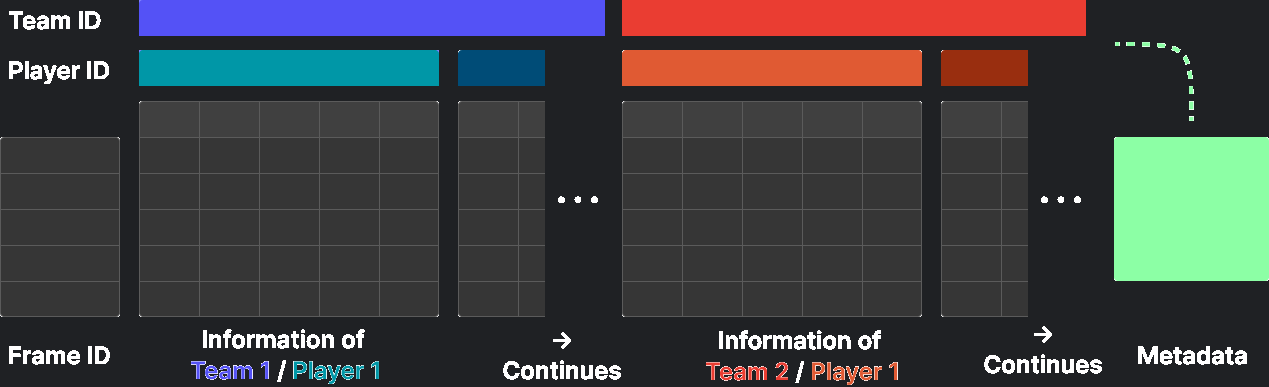
Sample BoundingBoxDataFrame#
import sportslabkit as slk

bbdf = slk.load_df('assets/sample_bbdf.csv')
bbdf.head()
| TeamID | 0 | ... | 1 | 3 | |||||||||||||||||
|---|---|---|---|---|---|---|---|---|---|---|---|---|---|---|---|---|---|---|---|---|---|
| PlayerID | 1 | 10 | ... | 9 | 0 | ||||||||||||||||
| Attributes | bb_left | bb_top | bb_width | bb_height | conf | bb_left | bb_top | bb_width | bb_height | conf | ... | bb_left | bb_top | bb_width | bb_height | conf | bb_left | bb_top | bb_width | bb_height | conf |
| frame | |||||||||||||||||||||
| 0 | 3543.0 | 607.0 | 30.0 | 52.5 | 1.0 | 3536.42 | 555.93 | 13.57 | 42.39 | 1.0 | ... | 2919.31 | 538.44 | 23.59 | 47.18 | 1.0 | 3542.77 | 549.47 | 6.4 | 7.0 | 1.0 |
| 1 | 3542.0 | 609.0 | 32.0 | 51.0 | 1.0 | 3536.13 | 555.96 | 13.66 | 42.27 | 1.0 | ... | 2919.44 | 538.55 | 23.59 | 47.18 | 1.0 | 3548.55 | 549.43 | 6.4 | 7.0 | 1.0 |
| 2 | 3542.0 | 611.0 | 32.0 | 50.0 | 1.0 | 3535.85 | 555.99 | 13.73 | 42.16 | 1.0 | ... | 2919.57 | 538.66 | 23.59 | 47.18 | 1.0 | 3554.32 | 549.40 | 6.4 | 7.0 | 1.0 |
| 3 | 3542.0 | 613.0 | 32.0 | 49.0 | 1.0 | 3535.57 | 556.02 | 13.80 | 42.04 | 1.0 | ... | 2919.70 | 538.77 | 23.59 | 47.18 | 1.0 | 3560.10 | 549.36 | 6.4 | 7.0 | 1.0 |
| 4 | 3539.0 | 615.0 | 36.0 | 46.0 | 1.0 | 3535.28 | 556.04 | 13.88 | 41.94 | 1.0 | ... | 2919.84 | 538.88 | 23.59 | 47.18 | 1.0 | 3565.87 | 549.33 | 6.4 | 7.0 | 1.0 |
5 rows × 115 columns
Sample CoordinatesDataFrame#
codf = slk.load_df('assets/sample_codf.csv')
codf.head()
| TeamID | 0 | ... | 1 | 3 | |||||||||||||||||
|---|---|---|---|---|---|---|---|---|---|---|---|---|---|---|---|---|---|---|---|---|---|
| PlayerID | 1 | 10 | 11 | 2 | ... | 7 | 8 | 9 | 0 | ||||||||||||
| Attributes | x | y | conf | x | y | conf | x | y | conf | x | ... | conf | x | y | conf | x | y | conf | x | y | conf |
| frame | |||||||||||||||||||||
| 0 | 53.133590 | 53.038124 | 1.0 | 52.62633 | 43.132626 | 1.0 | 54.01911 | 23.575058 | 1.0 | 68.94156 | ... | 1.0 | 29.863533 | 52.299420 | 1.0 | 26.115326 | 41.902317 | 1.0 | 52.755344 | 31.830680 | 1.0 |
| 1 | 53.132770 | 53.099983 | 1.0 | 52.61572 | 43.114075 | 1.0 | 54.01330 | 23.639513 | 1.0 | 68.94156 | ... | 1.0 | 29.885149 | 52.332210 | 1.0 | 26.135504 | 41.926130 | 1.0 | 53.072350 | 31.791082 | 1.0 |
| 2 | 53.131140 | 53.222996 | 1.0 | 52.60511 | 43.097652 | 1.0 | 54.00687 | 23.703869 | 1.0 | 68.76769 | ... | 1.0 | 29.906412 | 52.364944 | 1.0 | 26.155657 | 41.949930 | 1.0 | 53.389380 | 31.754894 | 1.0 |
| 3 | 53.129520 | 53.345060 | 1.0 | 52.59448 | 43.079075 | 1.0 | 54.00056 | 23.763563 | 1.0 | 68.66287 | ... | 1.0 | 29.927639 | 52.397614 | 1.0 | 26.175790 | 41.973686 | 1.0 | 53.707620 | 31.715126 | 1.0 |
| 4 | 53.098343 | 53.224068 | 1.0 | 52.58363 | 43.062626 | 1.0 | 53.99479 | 23.827623 | 1.0 | 68.76769 | ... | 1.0 | 29.949121 | 52.430195 | 1.0 | 26.196299 | 41.997395 | 1.0 | 54.025840 | 31.678797 | 1.0 |
5 rows × 69 columns
Simple accessors and methods#
Since the BBoxDataFrame and CoordinateDataFrame are subclasses of pandas.DataFrame, they inherit all of its functionality. This means that you can use all of the standard pandas.DataFrame methods and accessors.
For example,
df.head()returns the first 5 rows of the dataframedf.columnsreturns the column namesdf.iloc[0]returns the first row of the dataframe
# bbdf.head() is used above!

print(bbdf.columns[0])

bbdf.iloc[[0]]
('0', '1', 'bb_left')
| TeamID | 0 | ... | 1 | 3 | |||||||||||||||||
|---|---|---|---|---|---|---|---|---|---|---|---|---|---|---|---|---|---|---|---|---|---|
| PlayerID | 1 | 10 | ... | 9 | 0 | ||||||||||||||||
| Attributes | bb_left | bb_top | bb_width | bb_height | conf | bb_left | bb_top | bb_width | bb_height | conf | ... | bb_left | bb_top | bb_width | bb_height | conf | bb_left | bb_top | bb_width | bb_height | conf |
| frame | |||||||||||||||||||||
| 0 | 3543.0 | 607.0 | 30.0 | 52.5 | 1.0 | 3536.42 | 555.93 | 13.57 | 42.39 | 1.0 | ... | 2919.31 | 538.44 | 23.59 | 47.18 | 1.0 | 3542.77 | 549.47 | 6.4 | 7.0 | 1.0 |
1 rows × 115 columns
xs - Cross-section#
Note that these are MultiIndex dataframes, so you can use more advanced indexing methods, such as df.xs.
In this example,
df.xs(‘0’, level=’TeamID’, axis=1) returns the first team’s data
df.xs(‘5’, level=’PlayerID’, axis=1) returns the data for player 5 in all teams
df.xs((‘0’, ‘5’), level=(‘TeamID’, ‘PlayerID’), axis=1) returns the data for player 5 in team 0
bbdf.xs('0', level='TeamID', axis=1).head(3)
| PlayerID | 1 | 10 | ... | 8 | 9 | ||||||||||||||||
|---|---|---|---|---|---|---|---|---|---|---|---|---|---|---|---|---|---|---|---|---|---|
| Attributes | bb_left | bb_top | bb_width | bb_height | conf | bb_left | bb_top | bb_width | bb_height | conf | ... | bb_left | bb_top | bb_width | bb_height | conf | bb_left | bb_top | bb_width | bb_height | conf |
| frame | |||||||||||||||||||||
| 0 | 3543.0 | 607.0 | 30.0 | 52.5 | 1.0 | 3536.42 | 555.93 | 13.57 | 42.39 | 1.0 | ... | 3457.05 | 803.91 | 72.0 | 88.0 | 1.0 | 3060.33 | 592.52 | 35.89 | 62.07 | 1.0 |
| 1 | 3542.0 | 609.0 | 32.0 | 51.0 | 1.0 | 3536.13 | 555.96 | 13.66 | 42.27 | 1.0 | ... | 3455.43 | 802.76 | 72.0 | 88.0 | 1.0 | 3060.26 | 592.90 | 35.89 | 62.07 | 1.0 |
| 2 | 3542.0 | 611.0 | 32.0 | 50.0 | 1.0 | 3535.85 | 555.99 | 13.73 | 42.16 | 1.0 | ... | 3450.35 | 801.80 | 72.0 | 88.0 | 1.0 | 3060.19 | 593.29 | 35.89 | 62.07 | 1.0 |
3 rows × 55 columns
bbdf.xs('5', level='PlayerID', axis=1).head(3)
| TeamID | 0 | 1 | ||||||||
|---|---|---|---|---|---|---|---|---|---|---|
| Attributes | bb_left | bb_top | bb_width | bb_height | conf | bb_left | bb_top | bb_width | bb_height | conf |
| frame | ||||||||||
| 0 | 3720.0 | 504.0 | 12.0 | 27.0 | 1.0 | 3288.42 | 528.72 | 14.7 | 38.3 | 1.0 |
| 1 | 3720.0 | 504.0 | 12.0 | 27.0 | 1.0 | 3287.54 | 529.14 | 14.7 | 38.3 | 1.0 |
| 2 | 3720.0 | 504.0 | 12.0 | 27.0 | 1.0 | 3286.65 | 529.56 | 14.7 | 38.3 | 1.0 |
bbdf.xs(('0', '5'), level=('TeamID', 'PlayerID'), axis=1).head(3)
| Attributes | bb_left | bb_top | bb_width | bb_height | conf |
|---|---|---|---|---|---|
| frame | |||||
| 0 | 3720.0 | 504.0 | 12.0 | 27.0 | 1.0 |
| 1 | 3720.0 | 504.0 | 12.0 | 27.0 | 1.0 |
| 2 | 3720.0 | 504.0 | 12.0 | 27.0 | 1.0 |
loc - MultiIndex slicing#
MultiIndex slicing is a powerful tool for selecting data. Using the slice(None) object, you can select all data for a given index level. Although it’s a little verbose, it’s a very powerful tool once you get used to it.
In this example,
df.loc[:, (‘0’, slice(None))] returns the data for team 0
df.loc[:, (slice(None), ‘5’)] returns the data for team 0 player 5 in all teams
df.loc[:, (slice(None), slice(None), ‘x’)] returns the x coordinates for all players in all teams
# Select all the columns from TeamID 0
bbdf.loc[:, '0'].head(3)
| PlayerID | 1 | 10 | ... | 8 | 9 | ||||||||||||||||
|---|---|---|---|---|---|---|---|---|---|---|---|---|---|---|---|---|---|---|---|---|---|
| Attributes | bb_left | bb_top | bb_width | bb_height | conf | bb_left | bb_top | bb_width | bb_height | conf | ... | bb_left | bb_top | bb_width | bb_height | conf | bb_left | bb_top | bb_width | bb_height | conf |
| frame | |||||||||||||||||||||
| 0 | 3543.0 | 607.0 | 30.0 | 52.5 | 1.0 | 3536.42 | 555.93 | 13.57 | 42.39 | 1.0 | ... | 3457.05 | 803.91 | 72.0 | 88.0 | 1.0 | 3060.33 | 592.52 | 35.89 | 62.07 | 1.0 |
| 1 | 3542.0 | 609.0 | 32.0 | 51.0 | 1.0 | 3536.13 | 555.96 | 13.66 | 42.27 | 1.0 | ... | 3455.43 | 802.76 | 72.0 | 88.0 | 1.0 | 3060.26 | 592.90 | 35.89 | 62.07 | 1.0 |
| 2 | 3542.0 | 611.0 | 32.0 | 50.0 | 1.0 | 3535.85 | 555.99 | 13.73 | 42.16 | 1.0 | ... | 3450.35 | 801.80 | 72.0 | 88.0 | 1.0 | 3060.19 | 593.29 | 35.89 | 62.07 | 1.0 |
3 rows × 55 columns
# Select all the columns from TeamID 0 and PlayerID 5
bbdf.loc[:, ('0', '5')].head(3)
| Attributes | bb_left | bb_top | bb_width | bb_height | conf |
|---|---|---|---|---|---|
| frame | |||||
| 0 | 3720.0 | 504.0 | 12.0 | 27.0 | 1.0 |
| 1 | 3720.0 | 504.0 | 12.0 | 27.0 | 1.0 |
| 2 | 3720.0 | 504.0 | 12.0 | 27.0 | 1.0 |
# Select all the columns containg `bb_left` in the name
bbdf.loc[:, (slice(None), slice(None), 'bb_left')].head(3)
| TeamID | 0 | ... | 1 | 3 | |||||||||||||||||
|---|---|---|---|---|---|---|---|---|---|---|---|---|---|---|---|---|---|---|---|---|---|
| PlayerID | 1 | 10 | 11 | 2 | 3 | 4 | 5 | 6 | 7 | 8 | ... | 11 | 2 | 3 | 4 | 5 | 6 | 7 | 8 | 9 | 0 |
| Attributes | bb_left | bb_left | bb_left | bb_left | bb_left | bb_left | bb_left | bb_left | bb_left | bb_left | ... | bb_left | bb_left | bb_left | bb_left | bb_left | bb_left | bb_left | bb_left | bb_left | bb_left |
| frame | |||||||||||||||||||||
| 0 | 3543.0 | 3536.42 | 3560.51 | 3830.0 | 2671.0 | 4270.0 | 3720.0 | 3746.0 | 3818.0 | 3457.05 | ... | 3184.08 | 3525.94 | 3529.66 | 3526.23 | 3288.42 | 3312.47 | 3336.58 | 2832.56 | 2919.31 | 3542.77 |
| 1 | 3542.0 | 3536.13 | 3560.44 | 3830.0 | 2671.0 | 4270.0 | 3720.0 | 3746.0 | 3818.0 | 3455.43 | ... | 3184.20 | 3526.40 | 3531.11 | 3525.67 | 3287.54 | 3312.52 | 3336.72 | 2832.52 | 2919.44 | 3548.55 |
| 2 | 3542.0 | 3535.85 | 3560.36 | 3827.0 | 2670.5 | 4270.0 | 3720.0 | 3745.0 | 3818.0 | 3450.35 | ... | 3184.33 | 3526.86 | 3532.57 | 3525.11 | 3286.65 | 3312.57 | 3336.86 | 2832.47 | 2919.57 | 3554.32 |
3 rows × 23 columns
Iterators#
Both BBoxDataFrame and CoordinateDataFrame have several iterators that allow you to iterate over the data in different ways.
df.iter_frames()iterates over the data frame by framedf.iter_teams()iterates over the data frame by teamdf.iter_players()iterates over the data frame by playerdf.iter_attributes()iterates over the data frame by attribute
See the API documentation for more details.
for player_idx, player_df in bbdf.iter_players(drop=False):
    print(player_idx)
    break

player_df.head(3)
('0', '1')
| TeamID | 0 | ||||
|---|---|---|---|---|---|
| PlayerID | 1 | ||||
| Attributes | bb_left | bb_top | bb_width | bb_height | conf |
| frame | |||||
| 0 | 3543.0 | 607.0 | 30.0 | 52.5 | 1.0 |
| 1 | 3542.0 | 609.0 | 32.0 | 51.0 | 1.0 |
| 2 | 3542.0 | 611.0 | 32.0 | 50.0 | 1.0 |
Convert bbdf to codf#
This is a quick guide to converting BoundingBox loaded on SoccerTrack to the pitch coordinate.
1. Load video and BoundingBox#
import sportslabkit as slk
from sportslabkit.logger import show_df

dataset_path = slk.datasets.get_path("wide_view")
path_to_csv = sorted(dataset_path.glob("annotations/*.csv"))[0]
path_to_mp4 = sorted(dataset_path.glob("videos/*.mp4"))[0]

cam = slk.Camera(path_to_mp4)  # Camera object will be used to load frames
bbdf = slk.load_df(path_to_csv)  # We will use this as ground truth
bbdf.head()
| TeamID | 0 | ... | 1 | 3 | |||||||||||||||||
|---|---|---|---|---|---|---|---|---|---|---|---|---|---|---|---|---|---|---|---|---|---|
| PlayerID | 1 | 10 | ... | 9 | 0 | ||||||||||||||||
| Attributes | bb_left | bb_top | bb_width | bb_height | conf | bb_left | bb_top | bb_width | bb_height | conf | ... | bb_left | bb_top | bb_width | bb_height | conf | bb_left | bb_top | bb_width | bb_height | conf |
| frame | |||||||||||||||||||||
| 0 | 3543.0 | 607.0 | 30.0 | 52.5 | 1.0 | 3536.42 | 555.93 | 13.57 | 42.39 | 1.0 | ... | 2919.31 | 538.44 | 23.59 | 47.18 | 1.0 | 3542.77 | 549.47 | 6.4 | 7.0 | 1.0 |
| 1 | 3542.0 | 609.0 | 32.0 | 51.0 | 1.0 | 3536.13 | 555.96 | 13.66 | 42.27 | 1.0 | ... | 2919.44 | 538.55 | 23.59 | 47.18 | 1.0 | 3548.55 | 549.43 | 6.4 | 7.0 | 1.0 |
| 2 | 3542.0 | 611.0 | 32.0 | 50.0 | 1.0 | 3535.85 | 555.99 | 13.73 | 42.16 | 1.0 | ... | 2919.57 | 538.66 | 23.59 | 47.18 | 1.0 | 3554.32 | 549.40 | 6.4 | 7.0 | 1.0 |
| 3 | 3542.0 | 613.0 | 32.0 | 49.0 | 1.0 | 3535.57 | 556.02 | 13.80 | 42.04 | 1.0 | ... | 2919.70 | 538.77 | 23.59 | 47.18 | 1.0 | 3560.10 | 549.36 | 6.4 | 7.0 | 1.0 |
| 4 | 3539.0 | 615.0 | 36.0 | 46.0 | 1.0 | 3535.28 | 556.04 | 13.88 | 41.94 | 1.0 | ... | 2919.84 | 538.88 | 23.59 | 47.18 | 1.0 | 3565.87 | 549.33 | 6.4 | 7.0 | 1.0 |
5 rows × 115 columns
Now let’s visualize the loaded frames
frame = cam.get_frame(1)
vis_frame = bbdf.visualize_frame(1, frame)

slk.utils.cv2pil(vis_frame, convert_bgr2rgb=False).resize((vis_frame.shape[1] // 8, vis_frame.shape[0] // 8))

2. Convert BoundingBox coordinates to pitch coordinates#
First, load the match video and the corresponding pitch keypoints, and then compute the projection matrix.
import numpy as np
from ast import literal_eval
import json
from sportslabkit.utils import get_git_root, load_keypoints


keypoint_json = get_git_root() / 'notebooks/02_user_guide/assets/soccer_keypoints.json'
cam.source_keypoints, cam.target_keypoints = load_keypoints(keypoint_json)
print(cam.H)
[[  -0.022512    -0.15867      143.47]
 [  0.0039563    -0.25595      113.53]
 [ 5.8605e-05  -0.0030103           1]]
Based on the calculated projection matrix, the Bounding Box is projected onto the pitch coordinate.
The method argument can be used to the point within the bounding box to transform.
Options include center, bottom_middle, top_middle.
codf = bbdf.to_codf(cam.H, method='bottom_middle')
codf.head()
| TeamID | 0 | ... | 1 | 3 | |||||||||||||||||
|---|---|---|---|---|---|---|---|---|---|---|---|---|---|---|---|---|---|---|---|---|---|
| PlayerID | 1 | 10 | 11 | 2 | 3 | ... | 6 | 7 | 8 | 9 | 0 | ||||||||||
| Attributes | x | y | x | y | x | y | x | y | x | y | ... | x | y | x | y | x | y | x | y | x | y |
| frame | |||||||||||||||||||||
| 0 | 53.133591 | 53.038124 | 52.626331 | 43.132626 | 54.019112 | 23.575058 | 68.941559 | 31.393507 | 8.064067 | 33.066338 | ... | 40.216267 | 30.466066 | 39.744530 | 21.744230 | 29.863533 | 52.299419 | 26.115326 | 41.902317 | 52.755344 | 31.830681 |
| 1 | 53.132771 | 53.099983 | 52.615719 | 43.114075 | 54.013302 | 23.639513 | 68.941559 | 31.393507 | 8.064067 | 33.066338 | ... | 40.227959 | 30.505083 | 39.757240 | 21.762505 | 29.885149 | 52.332211 | 26.135504 | 41.926128 | 53.072350 | 31.791082 |
| 2 | 53.131142 | 53.222996 | 52.605110 | 43.097652 | 54.006870 | 23.703869 | 68.767693 | 31.407366 | 8.040876 | 33.068375 | ... | 40.239639 | 30.544065 | 39.769283 | 21.775953 | 29.906412 | 52.364944 | 26.155657 | 41.949928 | 53.389381 | 31.754894 |
| 3 | 53.129520 | 53.345058 | 52.594479 | 43.079075 | 54.000561 | 23.763563 | 68.662872 | 31.757370 | 8.017688 | 33.070412 | ... | 40.252113 | 30.586529 | 39.782303 | 21.794174 | 29.927639 | 52.397614 | 26.175791 | 41.973686 | 53.707619 | 31.715126 |
| 4 | 53.098343 | 53.224068 | 52.583630 | 43.062626 | 53.994789 | 23.827623 | 68.767693 | 31.407366 | 8.017688 | 33.070412 | ... | 40.263741 | 30.625376 | 39.794029 | 21.807644 | 29.949121 | 52.430195 | 26.196299 | 41.997395 | 54.025841 | 31.678797 |
5 rows × 46 columns
Finally, visualize the codf to verify that the BoundingBox is correctly projected
codf.visualize_frame(1, home_key='0', away_key='1', ball_key='3')

Convert codf to bbdf#
This is difficult but we’re working on it.